
Lesson
1.5 Why Create a New Session for Every Task? How Cache and Context Work
In this lesson, I want to cover the fundamentals of working with context and cache. You simply need to know these things to interact effectively with an LLM. Understanding context will allow you to formulate a task with surgical precision. And understanding cache will help you avoid going broke while working—or if you decide to write your own AI agent.
What lives in the context?
Context is everything we send to the neural network each time we press Enter. I think the clearest way to demonstrate this is with a small NodeJS script and a service that logs every request to the LLM and shows how many tokens were spent on input and output.
For this, I use my OpenRouter account. It has free models, and if you want to repeat the whole process, you can use them https://openrouter.ai/openrouter/free.
And here is the code I will run.
A NodeJS example for OpenRouter:
import OpenAI from "openai";

// Init OpenRouter
const client = new OpenAI({
  baseURL: "https://openrouter.ai/api/v1",
  apiKey: 'sk-api-key', // Your API-key from OpenRouter
});

// API call
const apiResponse = await client.chat.completions.create({
  model: 'openrouter/free',
  messages: [
    {
      role: "system",
      content: "You - AI-assistant. Ask very shortly."
    },
    {
      role: "user",
      content: "Hello! Wassup, bro?"
    }
  ],
});

// Extract the assistant message with reasoning_details
const response = apiResponse.choices[0].message.content;

console.log(response);
What is happening here?
We send the system prompt and our message to the LLM—these are the input tokens.
After that, we received a response from the LLM, which was printed to the console. These are the output tokens.
Here is the response I received.

And here’s how many tokens I spent on input and output: 38 + 86 = 124 tokens. Very economical.

In other words, with each of your messages, the entire conversation history is sent to the LLM. It may seem that with every message, we’ll spend more and more tokens by resending the entire conversation. You might expect astronomical bills. But that’s not the case. Caching was introduced specifically to solve this problem. We’ll talk about it a little later.
Exactly the same mechanism is used in complex systems, including Claude Code. The only difference is that when you write a single message, a large amount of additional information and context is added to it. And it’s not a hundred tokens, but usually several thousand.
What happens when you write "Hello" to your Claude Code?
To see this clearly, there’s even a special command. You can run it yourself in Claude Code and see what it outputs.
/context Here’s a snippet of the output; it goes on to explain in detail what the context is used for.
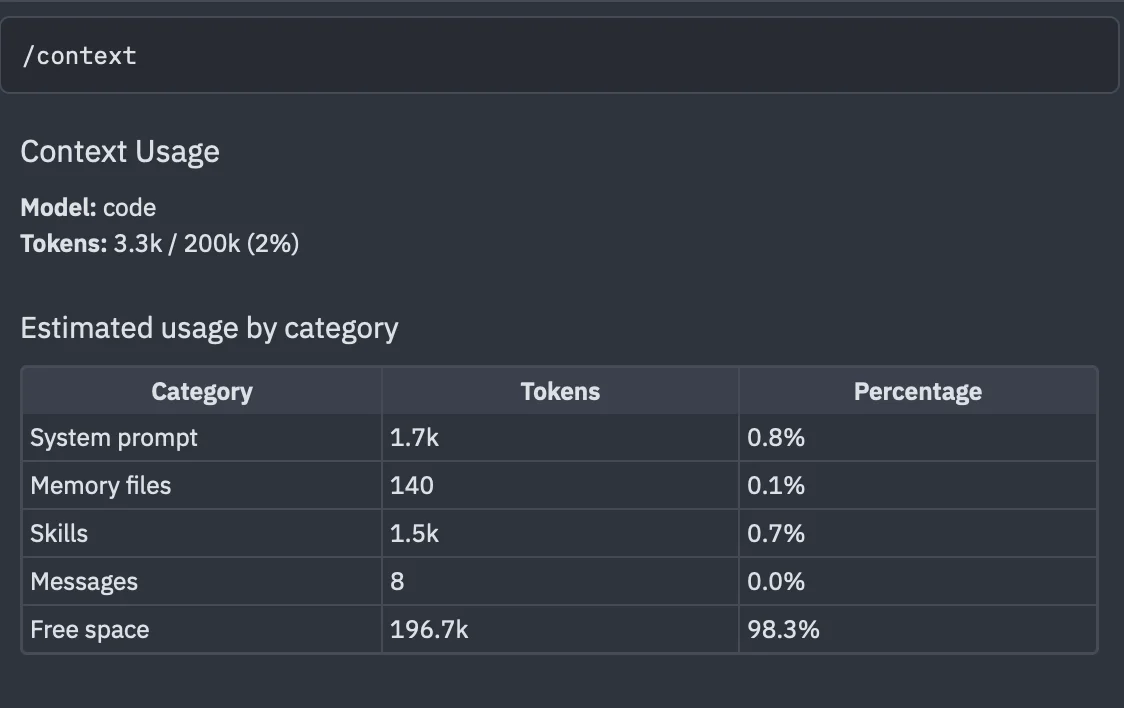
3,300 tokens were spent on a simple "Hello!".
What gets added to Claude Code’s context when you simply write "Hello!":
A hefty system prompt describing behavioral rules, command-line tools, and much more.
The operating system, username, and time zone
The current directory and project folder structure to a specified depth
Git status, list of changed files, current branch
CLAUDE.mdand.claude/rules/*.mdMetadata from all skills (not the full contents of the skill file, but its description from the beginning of the file)
MCP server connection configurations and descriptions of all available tools
Claude Code's automatic memory
All chat content, including your messages and messages from the neural network.
The system prompt and skill index usually take up the most context. But they are cached, so the extra tokens they consume are only spent at the very beginning.
How caching works on the LLM provider's side
When you send your request to an LLM provider, it uses context caching. The main idea is to avoid reprocessing a huge amount of text from scratch using the GPU, and instead reuse the mathematical weights that have already been calculated.
The cache stores not the request text itself, but the KV cache (Key-Value Cache) - these are intermediate mathematical matrices (keys and values) generated by the neural network's attention mechanism when processing tokens.
To check for matches, prefix hashing (Prefix Hashing) is used:
The provider splits your prompt into tokens.
The system creates a digital fingerprint (hash) for the beginning of the text (the prefix).
For a cache hit (Cache Hit) to occur, the beginning of your prompt must match exactly, character for character the text sent previously.
Important:
As you have probably already guessed, if you add or remove a skill or MCP server in the middle of a long conversation, change CLAUDE.md, or modify anything else that is included in the context, your cache is reset and your entire conversation will be processed and computed again from scratch, with the corresponding token costs.
OpenRouter has a special indicator for cacheable requests.
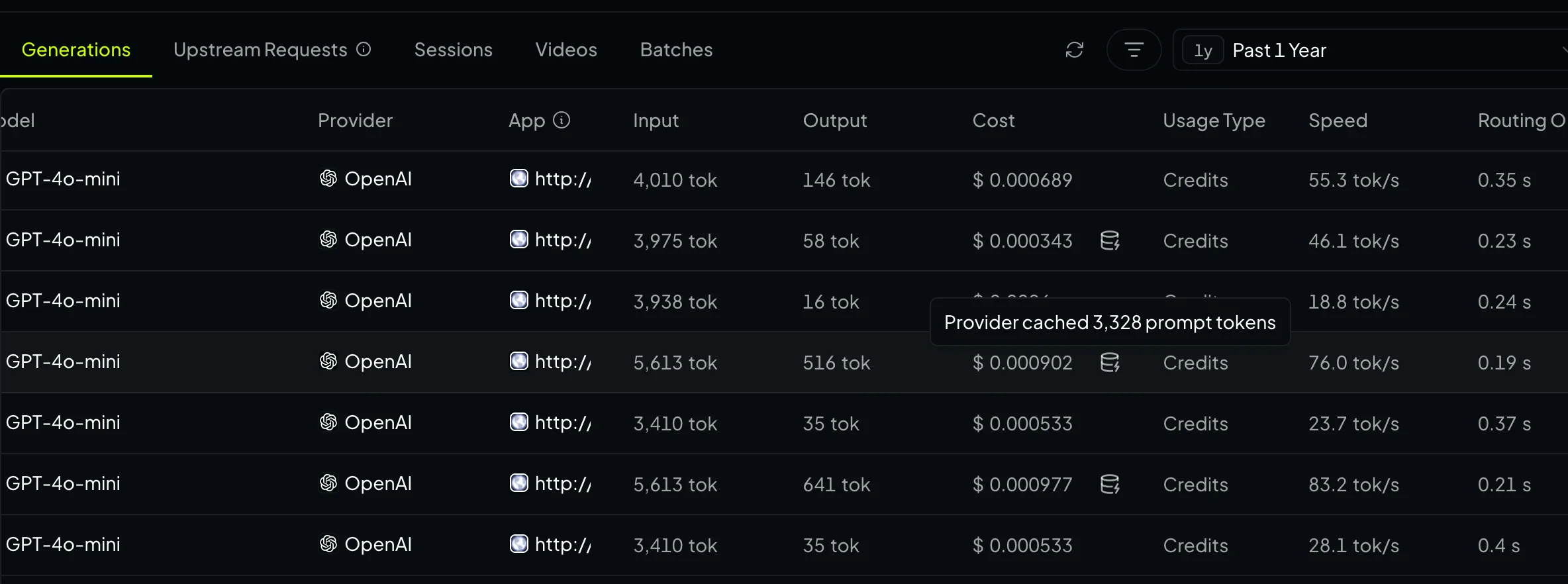
Note:
For cloud models, reading from the cache also costs money.
It is usually 10% of the cost of the input tokens.
The cache has a time-to-live, which can be 5 minutes, or one hour for enterprise models on standard plans.
Basic context-handling hygiene
Each task = a new session. If you try to work on several tasks in different parts of your project within a single session, the AI will start acting up and may make changes in places where you don't need them. Use the command
/newor create a new thread if you are working in ACP mode or in CodexStuffing all available information into the context is wrong; the right approach is to stuff all the information you need
Keeping all MCP servers available all the time is a bad idea; connect only the ones you need before writing your first prompt
Remember the caching rules from the previous chapter: don’t add MCP servers or skills in the middle of a session, and don’t change CLAUDE.md in the middle of a session
Don’t fill the context beyond 70%
If a task really requires a lot of context, ask the neural network to use subagents. For example, you can tell it:
Analyze the project and create a plan to add English language support
to the interface using i18n.
Break this plan down into tasks that an LLM can understand.
Then, execute these tasks using sub-agents.
This will allow it to perform small tasks in separate contexts and provide only the results to the main context.
If automatic context compression has kicked in, it means you’re doing something wrong
This usually happens when you don’t follow the rules described above. When the context is compressed, much of the logical chain is lost. As a rule, after context compression, the results of your task get worse and worse. So it’s better not to let things get that far.